Turn Your Product Catalog into AI Content: Social Posts, Images, Videos, and Listings
Most ecommerce brands already have the raw material for great content.
It is sitting inside the product catalog.
Product names.
Descriptions.
Images.
Prices.
Variants.
Materials.
Benefits.
Use cases.
Customer problems.
The problem is that most AI tools do not automatically use this context.
So the brand keeps starting from a blank prompt.
“Write a post about this product.”
“Create an image for this product.”
“Make a video script for this product.”
“Write listing content for this product.”
Then someone has to paste the same product details again and again.
That is not how ecommerce content should work.
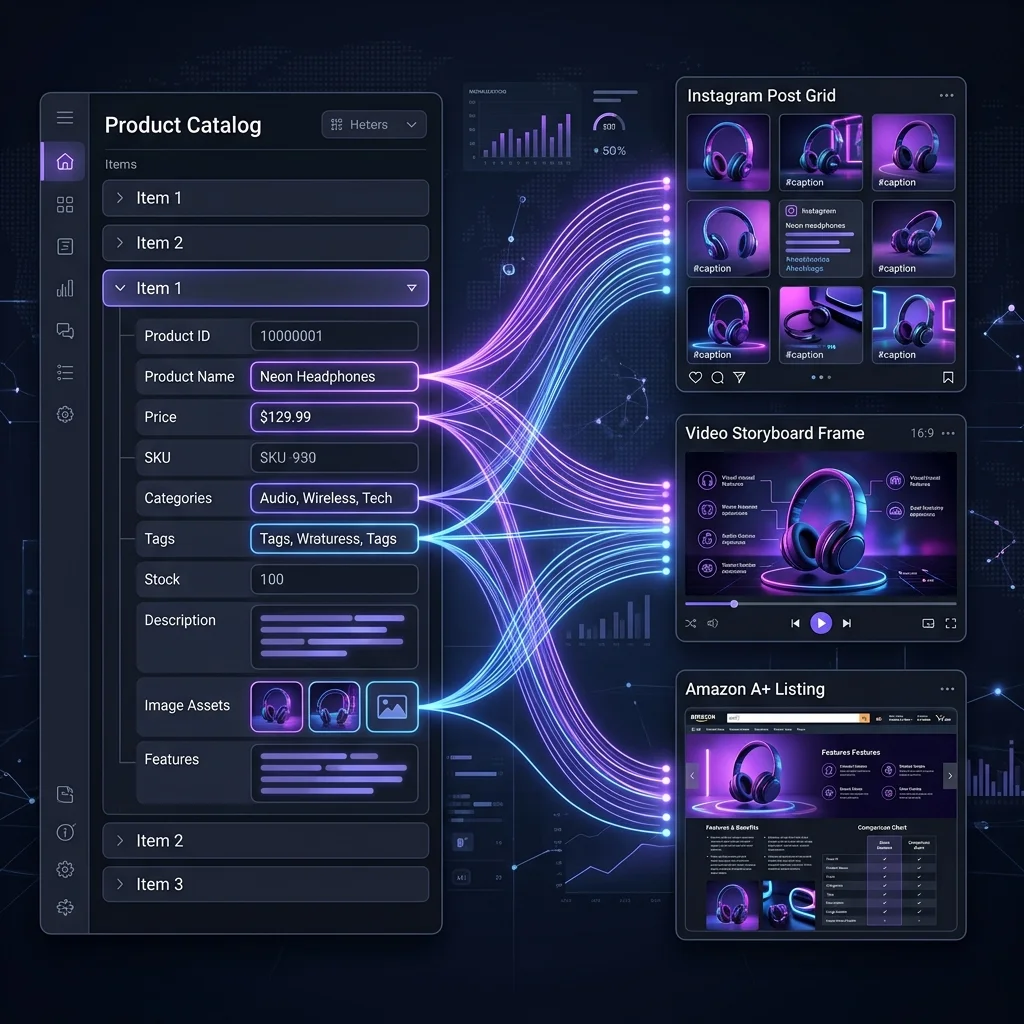
A better workflow starts with the product catalog. When AI understands what the brand actually sells, it can create content that is more useful, more specific, and easier to review.
This guide explains how ecommerce brands can turn product catalog data into social posts, product images, videos, marketplace listings, campaigns, and review-ready content.
Quick answer
A product catalog AI content generator uses real product data — such as product names, descriptions, images, prices, variants, benefits, and use cases — to create ecommerce content. Instead of starting from a blank prompt, the brand starts from the product. That product can then become social posts, product visuals, videos, listings, campaigns, and reusable assets.
What is a product catalog?
A product catalog is the collection of products your brand sells.
For an ecommerce brand, it usually includes:
- Product name
- Product description
- Product images
- Price
- Currency
- Variants
- Sizes
- Colors
- Materials or ingredients
- Category
- Availability
- Product page link
- SKU or product ID
- Extra product details
- Use cases
- Benefits
Your catalog may live inside Shopify, WooCommerce, Amazon Seller Central, a marketplace dashboard, a spreadsheet, or a product information system.
For many small brands, the product catalog is simply the store admin. (Shopify Help Center)
For larger teams, it may be connected to multiple channels.
But the idea is the same:
Your product catalog is where the truth about your products lives.
Why product catalog data matters for AI content
AI content is only as useful as the context it receives.
If the AI does not know the product, it guesses.
And when AI guesses, the output becomes vague.
You get captions like:
“Upgrade your lifestyle with our premium product.”
Or:
“Perfect for everyday use.”
Or the ecommerce classic:
“Designed for modern living.”
That may sound fine, but it does not help much.
A brand-aware AI content workflow can do better because it starts from real product details.
Instead of asking AI to invent content from a blank prompt, the system can use:
- What the product is
- What it looks like
- Who it is for
- What problem it solves
- What use cases matter
- What features should be highlighted
- What claims should be avoided
- What format is needed
- Which platform the content is for
That changes the quality of the output.
It also reduces the amount of repeated work.
Blank prompts are weak for ecommerce
A blank prompt puts too much work on the user.
The user has to explain:
- The brand
- The product
- The audience
- The offer
- The tone
- The platform
- The visual direction
- The content goal
- What not to say
That is fine once.
It gets painful when a team has 50 products.
Or 300 products.
Or five brands.
Or weekly product launches.
The problem is not that the AI tool is bad.
The problem is that the tool does not know what it is working with.
For ecommerce, AI should not start from a blank page.
It should start from the product.
What one product can become
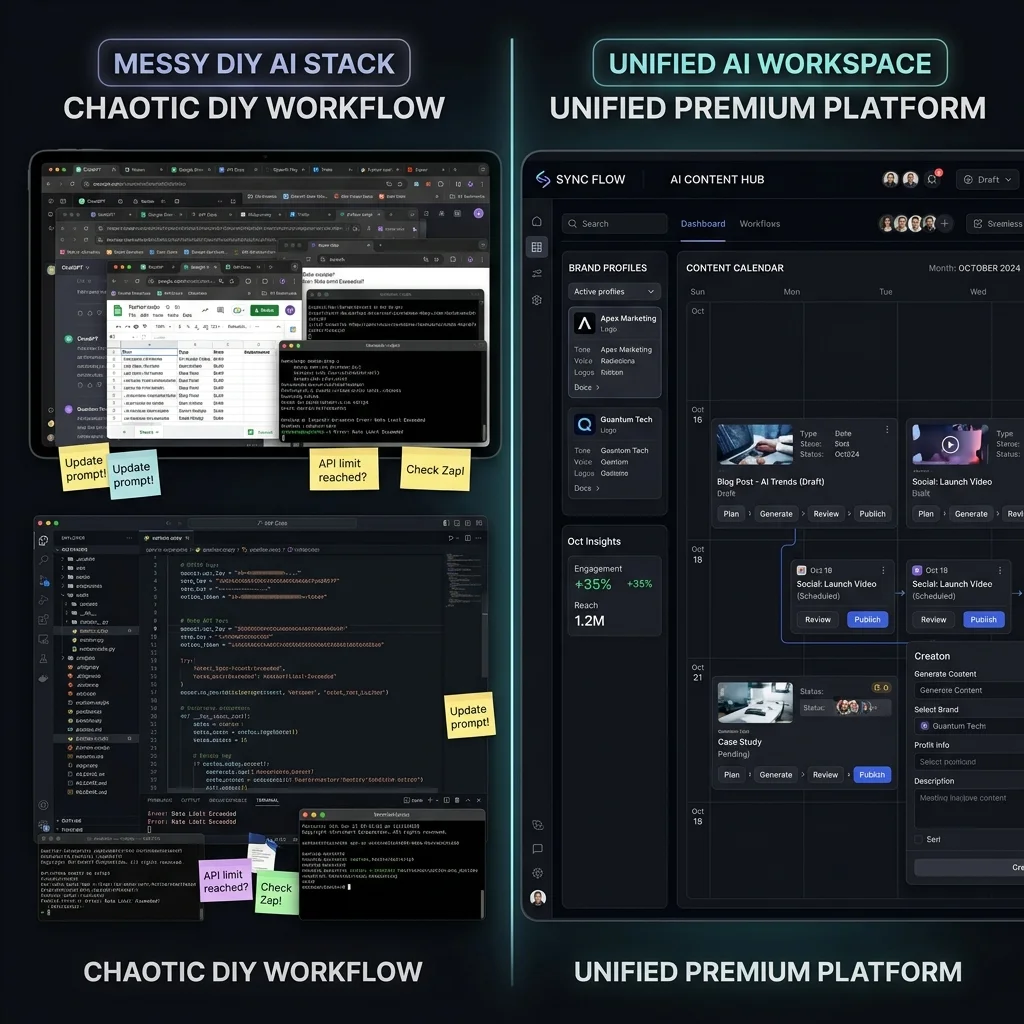
One product can create many pieces of content.
Take a travel organizer as an example.
From one product, a brand could create:
| Content type | Example output |
|---|---|
| Product description | Clear store copy explaining compartments, material, and use case |
| Instagram post | Product showcase post for travel packing |
| Carousel | “5 ways to organize your carry-on” |
| Product image | Flat lay with the organizer open |
| Lifestyle image | Organizer inside a suitcase |
| Creator video | Short product explainer with a travel-focused script |
| Founder post | Why the product was designed for frequent travelers |
| Marketplace image | Feature-led listing image set |
| Email teaser | Launch email for travel season |
| Campaign plan | 5-day launch campaign |
| Ad image | Benefit-led static creative |
| FAQ content | Questions around size, material, and compartments |
That is the power of product catalog content.
The product becomes the starting point for many workflows.
Not one caption.
Not one image.
A full content system.
What product data AI should use
A good product-aware workflow should use the right product details for the job.
| Product detail | Why it helps |
|---|---|
| Product name | Keeps content tied to the right item |
| Product description | Gives the AI the core product story |
| Product images | Helps create visual and product-aware outputs |
| Price | Useful for offer posts and product context |
| Variants | Prevents wrong size, color, or version claims |
| Materials or ingredients | Supports feature explanations |
| Dimensions | Useful for scale and marketplace visuals |
| Use cases | Helps create lifestyle and education content |
| Benefits | Helps shape captions, visuals, and video scripts |
| Customer objections | Helps create helpful content |
| Claims to avoid | Reduces risky or exaggerated output |
| Platform target | Helps adapt content for Instagram, Facebook, marketplace, or ads |
The richer the product context, the better the starting point.
But product data still needs review.
If the catalog has old prices, weak descriptions, missing images, or incomplete product facts, AI output can still be weak.
The catalog is the starting point.
The team still needs judgment.
Product catalog to social posts
Social posts are one of the easiest ways to use product catalog data.
A product can become:
- Product showcase post
- Product + person post
- Carousel
- Launch post
- Offer post
- Social proof post
- Founder story
- Educational post
- Problem-solution post
- Comparison post
The difference between generic and product-aware social content is simple.
Generic AI says:
“Write an Instagram post about a backpack.”
Product-aware AI knows:
- The backpack has anti-theft zippers
- It fits a 15-inch laptop
- It is made from recycled fabric
- It has a separate shoe compartment
- It is designed for weekend travel
- The brand voice is minimal and practical
Now the post can be specific.
Specific content is easier to trust.
It is also easier for the team to review. Learn more in our guide on AI social media automation for ecommerce brands.
Product catalog to images
Product catalog data can also help create product images.
Useful image types include:
- Studio product shot
- Lifestyle scene
- Product-in-use image
- Flat lay
- Detail close-up
- Environmental image
- Marketplace image
- Ad image
- Campaign image
Product images need more than creativity.
They need accuracy.
The image should show the product correctly.
The color should not change.
The scale should not be misleading.
The scene should not imply unsupported use.
The product should not gain features it does not have.
This is why product catalog context matters.
AI should know what the product is before generating visuals. Read about this in AI product image automation for ecommerce.
And humans should still review the final image before it is published.
Product catalog to videos
A product catalog can also support video content.
A product can become:
- Creator-style product video
- Short product ad
- Founder-led product video
- How-to video
- Product education video
- Launch teaser
- Problem-solution video
- Social proof video
For video, product context is especially important.
The script should describe the actual product.
The scene should fit the use case.
The language should match the audience.
The claims should be accurate.
The product should be shown in a realistic way. Learn more about AI product video automation.
A product-aware video workflow should use the catalog as the starting point, then allow the team to review the script and final output.
Product catalog to marketplace listings
Marketplace content has its own needs.
A marketplace image set is not the same as a social post.
For a product listed on Amazon, Walmart, Flipkart, Etsy, eBay, or other marketplaces, the brand may need:
- Main image
- Feature image
- Lifestyle image
- Size or scale image
- What’s-in-the-box image
- Comparison image
- Infographic
- Listing copy
- Product highlights
- A+ style content for Amazon
This is where product catalog content becomes very valuable.
The product already has the facts.
The workflow needs to turn those facts into clear marketplace assets.
But marketplace content should always be reviewed.
AI can help create a strong starting point, but teams still need to check rules, claims, image quality, product accuracy, and platform fit.
Product catalog to campaigns
A product catalog can also support campaigns.
For example, one product can become a 3-day, 5-day, or 7-day launch sequence.
A simple 5-day campaign might look like this:
| Day | Content angle |
|---|---|
| Day 1 | Teaser: introduce the problem |
| Day 2 | Product reveal |
| Day 3 | Feature education |
| Day 4 | Product-in-use visual |
| Day 5 | Offer or final reminder |
This works better when the campaign is tied to a product.
The product gives the campaign focus.
Without product context, campaign ideas can become generic.
With product context, the campaign can answer real buyer questions. Read about automating this in ecommerce content calendar automation.
Product catalog to reusable assets
Good ecommerce content should not be used once and forgotten.
A product image can support:
- Social post
- Ad creative
- Product page
- Marketplace listing
- Email campaign
- Founder post
A product video script can support:
- Reel
- Founder video
- Creator video
- Product page clip
- Paid ad concept
A product carousel can become:
- Instagram post
- Email section
- Marketplace education image
- Blog visual
- Sales deck asset
This is why a media library matters.
If assets are scattered across different tools and folders, the team loses the benefit of reuse.
A product-aware workflow should save content in a way the team can find again.
The simple workflow: product to content
Here is the practical workflow ecommerce teams should aim for.
Step 1: Start with the product
Choose the product first.
Do not start from a blank prompt.
Start with the product name, images, description, benefits, and use cases.
Step 2: Add brand context
The same product can sound different depending on the brand.
A premium skincare brand, a playful pet brand, and a technical electronics brand should not speak the same way.
Brand context keeps content consistent.
Step 3: Choose the content type
Decide what you need:
- Social post
- Product image
- Creator video
- Listing image
- Campaign
- A+ style content
- Founder post
- Ad creative
Each content type has a different job.
Step 4: Generate the first draft or asset
Use AI to create a starting point.
This may be copy, image direction, visual asset, script, storyboard, campaign plan, or listing set.
Step 5: Review carefully
Check:
- Product accuracy
- Claims
- Price
- Variant
- Visual truth
- Platform format
- Marketplace fit
- Brand tone
Review is not optional.
It is what keeps AI useful and safe for real commerce work. See how to establish this with our AI content approval workflow.
Step 6: Save and reuse
Approved content should be easy to find later.
Save it in a media library or organized workspace.
A good product asset should keep working for the brand.
Example: pet travel mat
Imagine a brand sells a foldable pet travel mat.
Product catalog data:
- Product name: Foldable Pet Travel Mat
- Product image: Mat folded and open
- Use case: car rides, hotel stays, outdoor rest
- Benefit: easy to carry, washable, comfortable
- Audience: dog owners who travel
- Material: padded fabric
- Variant: two sizes
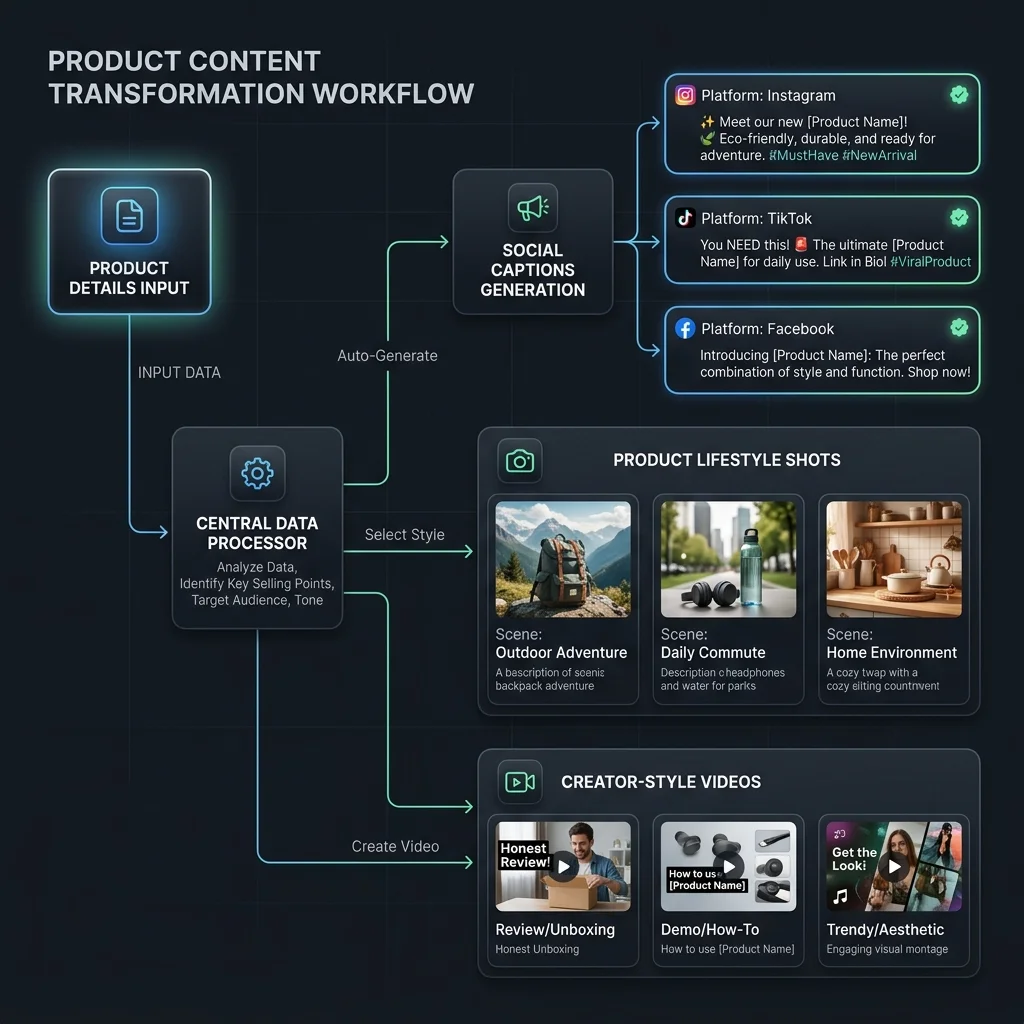
From this one product, AI can help create:
- Instagram product post
- Carousel: “How to keep your dog comfortable while traveling”
- Lifestyle image: dog resting beside packed luggage
- Product detail image: washable fabric and foldable strap
- Creator video script: “What I pack for road trips with my dog”
- Marketplace image set
- Launch campaign
- Email teaser
- FAQ content
Now the content is not generic pet content.
It is tied to the actual product.
Example: desk lamp
Product catalog data:
- Product name: Compact Adjustable Desk Lamp
- Product image: Lamp folded and open
- Use case: work-from-home desks
- Benefits: adjustable arm, small footprint, warm light
- Audience: students, remote workers, small apartments
- Variant: black and white
From this product, AI can create:
- Product showcase post
- Desk setup lifestyle image
- Feature infographic
- Short video script
- Comparison post: small desk vs large desk setup
- Marketplace listing images
- Campaign around “better desk setup”
- Product FAQ
- Email section for back-to-school or remote work season
Again, the product drives the content.
That is the point.
Common mistakes when using product catalog data for AI content
Mistake 1: Using incomplete product data
If the product description is weak, the AI output will be weak.
Fix the product facts first.
Mistake 2: Ignoring images
Images are one of the most important parts of product context.
A product-aware workflow should use product images where possible.
Mistake 3: Letting AI invent claims
AI should not invent product benefits, certifications, ingredients, safety claims, or compatibility.
If it is not in the product truth, review it carefully.
Mistake 4: Treating all platforms the same
Instagram, Facebook, Amazon, Etsy, TikTok Shop, email, and product pages all need different formats.
One product can feed many channels, but the output should be adapted.
Mistake 5: Not saving approved assets
If approved content is not saved properly, the team will recreate work later.
That is wasted effort.
How AgenixSocial helps turn products into content
AgenixSocial is built around this idea:
Your products should be the starting point for content creation.
Products inside AgenixSocial act as the content source of truth. Product context can include product name, images, description, price, and user-added bullet points.
Brand DNA adds reusable brand context so the content does not start from zero each time.
Together, Brand DNA and Products help AgenixSocial create product-aware content across different workflows.
| Content need | AgenixSocial module |
|---|---|
| Reusable brand context | Brand DNA |
| Product source of truth | Products |
| Product social posts | Content Studio / Quick Post |
| Product visuals | Product Shots |
| Creator-style videos | AI Creator Videos |
| Product launch campaigns | Campaigns |
| Marketplace image sets | Marketplace Listing Studio |
| Amazon-style A+ content | Amazon A+ Studio |
| Human review | Approval Queue |
| Scheduling | Calendar |
| Asset reuse | Media Library |
| Flexible usage | Pay-as-you-go credits |
AgenixSocial is useful when ecommerce teams do not want to paste product details into every AI tool manually.
The workflow is simpler:
- Build Brand DNA.
- Add or import products.
- Select a product.
- Choose the content workflow.
- Generate a strong starting point.
- Review the output.
- Schedule, download, or save for reuse.
AgenixSocial gives ecommerce teams a stronger starting point by grounding workflows in reusable brand and product context. Teams still review final assets for product accuracy, claims, marketplace fit, platform fit, and brand tone before publishing or uploading.
That review step matters.
The goal is not autopilot.
The goal is better product context, less repeated prompting, and faster review-ready content.
When product catalog AI is enough
A product catalog AI workflow is useful when:
- You have clear product data
- You create content often
- You manage many SKUs
- You need social posts from products
- You need product images and videos
- You create marketplace assets
- You run campaigns
- You want to reuse approved assets
- You do not want to explain products in every prompt
This is a strong fit for D2C founders, ecommerce marketers, marketplace sellers, and agencies managing brand content.
When product catalog AI still needs human review
Product catalog AI does not remove review.
Teams should still check:
- Is the product described correctly?
- Is the image accurate?
- Are claims supported?
- Is the price current?
- Are variants represented correctly?
- Does the content fit the platform?
- Does the content match the brand?
- Does marketplace content need extra checking?
- Is the asset saved in the right place?
AI can speed up the work.
The team still owns the final decision.
FAQ
What is an AI content generator with product catalog?
An AI content generator with product catalog uses real product data such as product names, descriptions, images, prices, variants, and benefits to create content. This helps ecommerce brands generate more specific social posts, product images, videos, listings, and campaigns.
Why is product catalog data useful for AI content?
Product catalog data gives AI the facts about what the brand sells. Without product context, AI often creates generic captions or vague product copy. With product context, the output can be more specific and easier to review.
Can AI create social posts from a product catalog?
Yes. AI can use product names, descriptions, benefits, images, and use cases to create product showcase posts, carousels, launch posts, educational posts, offer posts, and social proof content.
Can AI create product images from catalog data?
AI can help create product visuals when it has product context and reference images. Teams should still review the final image for product accuracy, scale, color, claims, and platform fit.
Can AI create product videos from catalog data?
Yes. Product catalog data can help AI create video scripts, creator-style product videos, product explainers, launch teasers, and short ad ideas. Human review is still needed before publishing.
Can product catalog AI help with marketplace listings?
Yes. Product catalog AI can help turn product facts into marketplace content such as listing images, feature callouts, infographics, product highlights, and A+ style content. Sellers still need to review marketplace rules and product accuracy.
What product data should I give AI?
Useful product data includes product name, description, images, price, variants, materials or ingredients, dimensions, benefits, use cases, target audience, and claims to avoid.
How does AgenixSocial use product catalog context?
AgenixSocial uses Products as the content source of truth and Brand DNA as the reusable brand context. Teams can create product-aware social posts, product visuals, creator videos, campaigns, marketplace assets, and review-ready content from one workspace.
Conclusion
Your product catalog is more than a list of products.
It is the starting point for better AI content.
When AI starts from the product, the content becomes more specific.
When AI also understands the brand, the content becomes more consistent.
That is how ecommerce teams move beyond blank prompts.
One product can become a social post, image, video, listing, campaign, founder story, ad concept, and reusable asset.
The key is to keep product truth at the center.
Start with the product.
Add brand context.
Choose the content format.
Generate a strong starting point.
Review carefully.
Save and reuse the final assets.
That is how product catalog data turns into a real ecommerce content workflow.