Claude, n8n, Make, or a Commerce Content Workspace: Which Fits Ecommerce Content Operations?
Claude can reason.
n8n can automate.
Make can connect apps.
A commerce content workspace helps ecommerce teams create, review, schedule, export, and reuse product-aware content without wiring every step themselves.
All four can be useful.
The mistake is treating them as the same kind of tool.
A technical founder may want Claude connected to Model Context Protocols (MCPs), n8n workflows, image APIs, video tools, voice tools, schedulers, and custom scripts. That setup can be powerful if someone wants to build and maintain it.
A D2C founder, ecommerce marketer, Amazon seller, or agency operator usually wants something else: product-aware content that is accurate, on-brand, platform-ready, reviewable, and reusable.
That is not only an AI problem.
That is a content operations problem.
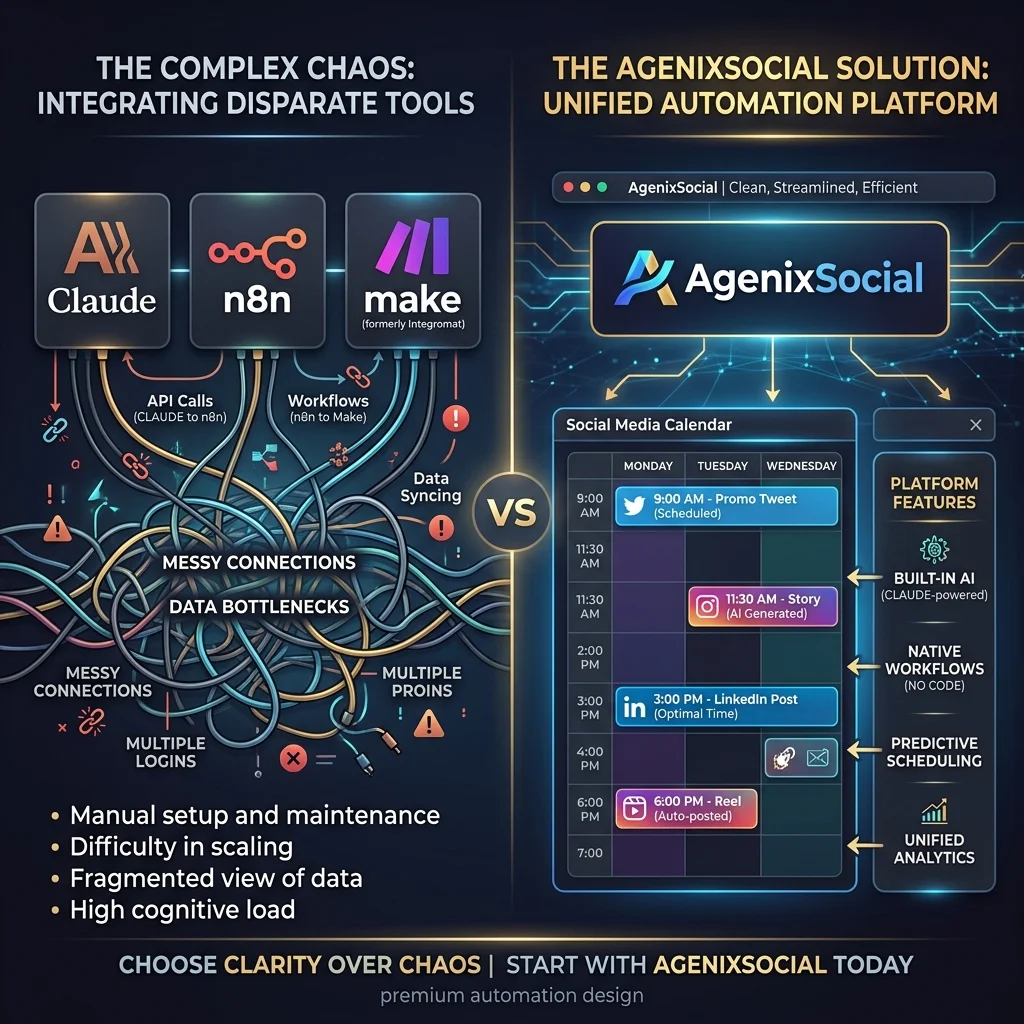
This guide compares Claude, n8n, Make, and a commerce content workspace so ecommerce teams can choose the right operating model instead of accidentally creating a subscription-heavy AI machine that nobody wants to maintain.
Quick answer
Use Claude when you need reasoning, writing, planning, or custom AI assistance. Use n8n when a technical team wants deep workflow automation and API control. Use Make when you need easier no-code app connections. Use a commerce content workspace when ecommerce teams need product-aware content creation, visuals, videos, marketplace assets, approvals, scheduling, and media reuse without building the workflow stack themselves.
The real question is not “which tool is best?”
The better question is:
What job are you trying to operate repeatedly?
For ecommerce content, the job may include:
- Product descriptions
- Social posts
- Instagram carousels
- Founder-led posts
- Product shots
- Creator-style videos
- Marketplace listing images
- Amazon A+ content
- Product launch campaigns
- Approval workflows
- Content calendar scheduling
- Media library organization
- Downloads and exports
- Multi-brand or client workflows
A single AI tool can help with part of this.
An automation tool can connect parts of this.
A no-code platform can make some connections easier.
But ecommerce teams need to decide whether they are trying to build a workflow or use a workflow.
That is the fork in the road.
Option 1: Claude for ecommerce content operations
Claude is useful when the core task is thinking, writing, summarizing, reasoning, planning, or creating structured drafts.
For ecommerce content, Claude can help with:
- Product description drafts
- Blog outlines
- SEO briefs
- Social captions
- Product launch messaging
- Founder posts
- Marketplace bullet ideas
- Email campaign copy
- Content repurposing
- Campaign brainstorming
- Review checklists
- Image prompt writing
- Video script writing
Claude Skills and MCPs can make Claude more reusable and connected. Skills can package repeated instructions, while MCPs can connect Claude to external systems, files, tools, and databases.
This is powerful for builders. But as we discussed in our guide on Claude Skills vs Commerce Content Workspaces, Claude is still not a complete ecommerce content operating system by itself.
Where Claude works well
Claude works well when:
- The task is mostly text
- The user can provide context
- The workflow is exploratory
- The team needs strategic thinking
- A human will review the output
- The user is comfortable managing prompts, Skills, or connected tools
- The content is not dependent on many platform-specific asset formats
For example, Claude can help a founder turn messy launch thoughts into a campaign brief. It can rewrite product descriptions in a tone that fits the brand. It can generate multiple positioning angles. It can write a first draft of a blog. That is valuable.
Where Claude gets heavy
Claude gets heavy when the workflow requires:
- Persistent brand memory
- Accurate product catalog context
- Product images
- Creator-style videos
- Voice generation
- Marketplace image sets
- Amazon A+ modules
- Calendar scheduling
- Approval queues
- Downloads and organized assets
- Multi-platform formatting
- Multiple external subscriptions
- MCP/API setup and maintenance
At that point, Claude becomes the reasoning layer inside a larger tool stack. The user still has to connect the rest. That is fine if the user wants to build. It is not fine if the user just wants to create.
Option 2: n8n for ecommerce content operations
n8n is a workflow automation builder. It is strong when a technical team wants to connect systems, APIs, databases, AI models, approvals, and publishing tools.
For ecommerce content, n8n can automate flows such as:
- New product added → generate product description draft
- New blog published → create social post drafts
- New campaign row approved → generate captions and reminders
- Product data updated → notify content team
- AI draft ready → send for human approval
- Approved content → update CMS or scheduler
- Published post → log URL in a sheet
As outlined in our comparison of n8n Social Media Automation vs Native Brand Calendars, n8n is powerful because it gives the builder complete control.
Where n8n works well
n8n works well when:
- The workflow is highly custom
- The team has technical ownership
- API access matters
- Internal systems need to connect
- The team wants self-hosting or deeper control
- The workflow needs branching logic
- Automation is part of a broader backend process
For example, an ecommerce team with an internal product database, custom CMS, and technical ops team may use n8n to connect product data, AI copy generation, approval, and CMS updates. That can be a smart setup.
Where n8n gets heavy
n8n gets heavy when marketers or founders must maintain:
- API credentials and node versions
- Webhook routing and error handling
- Prompt templates and model updates
- Image/video tool API payloads
- File storage paths and asset names
- Approval loops and schedules
- Product ID mapping
- Marketplace format logic
n8n can connect the workflow, but it does not automatically understand the commerce content workflow. The team still has to design it. And if something breaks, someone has to debug it. That someone is often the person who was supposed to be planning the campaign.
Option 3: Make for ecommerce content operations
Make is useful when teams want visual no-code automation across apps. It is usually easier for non-developers than building everything from scratch.
For ecommerce teams, Make can help connect Shopify, WooCommerce, Google Sheets, Airtable, Notion, Slack, Google Drive, email tools, social platforms, and AI tools. A Make scenario can move data from one app to another and automate repetitive steps.
Where Make works well
Make works well when:
- The user wants visual automation
- The workflow is app-to-app
- The team wants less technical setup than custom code
- Existing tools already hold the content data
- The process is repetitive and predictable
- The user wants to automate notifications, updates, and handoffs
For example:
- When a new product is added in Shopify, create a content task in Notion.
- When a product launch date is near, send a Slack reminder.
- When an approved asset is uploaded to Drive, add a row to a content tracker.
- When a blog is published, create a social scheduling task.
Where Make gets heavy
Make gets heavy when the workflow becomes content production, not app automation.
Ecommerce content often needs:
- Product-aware copy
- Product images
- Product videos
- Marketplace-ready images
- Platform dimensions
- Brand rules
- Approval context
- Draft states
- Calendar planning
- Reusable media
- Visual review
Make can connect tools that do these things. But the user still has to decide which tools, how they connect, how context moves between them, how review works, and who owns failures. No-code does not mean no responsibility. It simply makes the wiring easier to see.
Option 4: Zapier-style automation
Even if the decision is framed as Claude, n8n, or Make, many ecommerce teams also consider Zapier-style automation because it is familiar and easy to start.
Zapier-style tools are useful when the job is simple:
- Trigger from one app
- Send data to another app
- Create a task
- Notify a person
- Generate a text output
- Update a row
- Move a file
- Add a draft somewhere
This is a good starting point for simple content ops. But once the workflow needs product visuals, videos, multiple asset types, platform-specific formats, review logic, and media reuse, it runs into the same problem: the automation connects tools, but the user still operates the content system.
Option 5: A commerce content workspace
A commerce content workspace is different. It does not start from “Which apps should we connect?” It starts from: “What does this brand need to create around this product?”
For ecommerce teams, that is usually the better starting point.
A commerce content workspace should understand:
- The brand DNA and guidelines
- The product catalog
- The content workflow
- The target platforms and visual formats
- The campaign context
- The review and approval step
- The publishing calendar
- The media library
- The export/download path
That is where AgenixSocial fits. AgenixSocial is not trying to beat Claude at general reasoning. It is not trying to beat n8n at custom workflow automation. It is not trying to beat Make at connecting every possible app.
It is built for a narrower, more practical job: help ecommerce teams create product-aware commerce content from reusable brand and product context.
The comparison table
| Need | Claude | n8n | Make | Commerce content workspace |
|---|---|---|---|---|
| Reasoning and strategy | Strong | Depends on AI nodes | Depends on AI integrations | Guided by product workflow |
| Reusable instructions | Strong with Skills | Possible through prompts/workflows | Possible through scenarios | Native through productized workflow |
| Tool connections | Strong with MCP/API setup | Strong | Strong no-code | Focused on commerce content tools |
| Product catalog context | User must provide/connect | User must fetch/map | User must fetch/map | Native product context |
| Brand memory | Prompt/Skill/project setup | External prompt/data source | External prompt/data source | Brand DNA |
| Product images | Needs image tool | Needs connected image tool | Needs connected image tool | Product Shots |
| Creator videos | Needs video/avatar/voice tools | Needs connected tools | Needs connected tools | AI Creator Videos |
| Marketplace assets | User builds workflow | User builds workflow | User builds workflow | Marketplace Listing Studio |
| Amazon A+ style assets | User plans manually | User builds workflow | User builds workflow | Amazon A+ Studio |
| Campaign planning | Strong writing support | Build workflow | Build scenario | Campaigns |
| Approval | Manual/custom | Custom approval flow | Custom approval flow | Approval Queue |
| Scheduling | External scheduler | Connected scheduler | Connected scheduler | Calendar |
| Media reuse | External folders/DAM | External folders/DAM | External folders/DAM | Media Library |
| Learning curve | Medium to high | High | Medium | Lower for standard commerce workflows |
| Flexibility | Very high | Very high | High | More focused |
| Maintenance burden | User-owned | User-owned | User-owned | Product-owned for standard workflows |
| Best for | AI builders and strategists | Technical automation teams | No-code operators | Ecommerce teams creating repeatable content |
The table makes the real tradeoff clear. Claude, n8n, and Make are better when you want to build a custom system. A commerce content workspace is better when you want to operate a repeatable content system.
The ecommerce reality: content is not only text
Many AI automation discussions start with text: product descriptions, captions, blog outlines, and email drafts. Text is the easiest part. Ecommerce teams also need visuals.
A product launch may need:
- Product shots
- Lifestyle images
- Founder content
- Creator-style video
- Marketplace image set
- A+ content modules
- Instagram carousel
- Product launch campaign
- Approval before publishing
- Calendar scheduling
- Organized exports
A Claude prompt can plan this, n8n can wire it, and Make can connect apps. But the workflow still needs to exist. The user still needs to know which tool handles each asset, how product context is passed, which output is approved, and where the final content lives.
That is where ecommerce teams start feeling the weight of DIY AI.
Example: launching one product
Imagine a brand launching a new desk organizer. The team needs:
- Social posts
- Product images
- Product-in-use visuals
- Creator-style video
- Marketplace image set
- Email teaser
- Founder note
- Campaign calendar
- Review and approval
- Downloadable assets
With Claude
Claude can create the launch plan, captions, image prompts, and video scripts. But the user still needs to:
- Provide brand context.
- Provide product context.
- Send image prompts to an image tool.
- Send video script to a video tool.
- Store generated assets.
- Review product accuracy.
- Move content into a scheduler.
- Track approved versions.
Claude helps with thinking and writing. The user still operates the workflow.
With n8n
n8n can automate parts of the workflow. It can pull product data, call AI models, route drafts for review, store files, and push approved content into other systems.
But someone must build and maintain the workflow. The user still needs to decide:
- Which product fields matter
- Which tools generate images/videos
- What approval means
- Where assets go
- How errors are handled
- How platform-specific formats are enforced
n8n helps with automation. The user still owns the system.
With Make
Make can connect the apps visually, creating a smoother no-code automation path. But the content logic still has to be designed. Make can move a product row into a content workflow. It does not automatically know what a marketplace image set, product-aware creator video, campaign calendar, or approved media library should contain.
Make helps with app connections. The user still designs the content workflow.
With a commerce content workspace
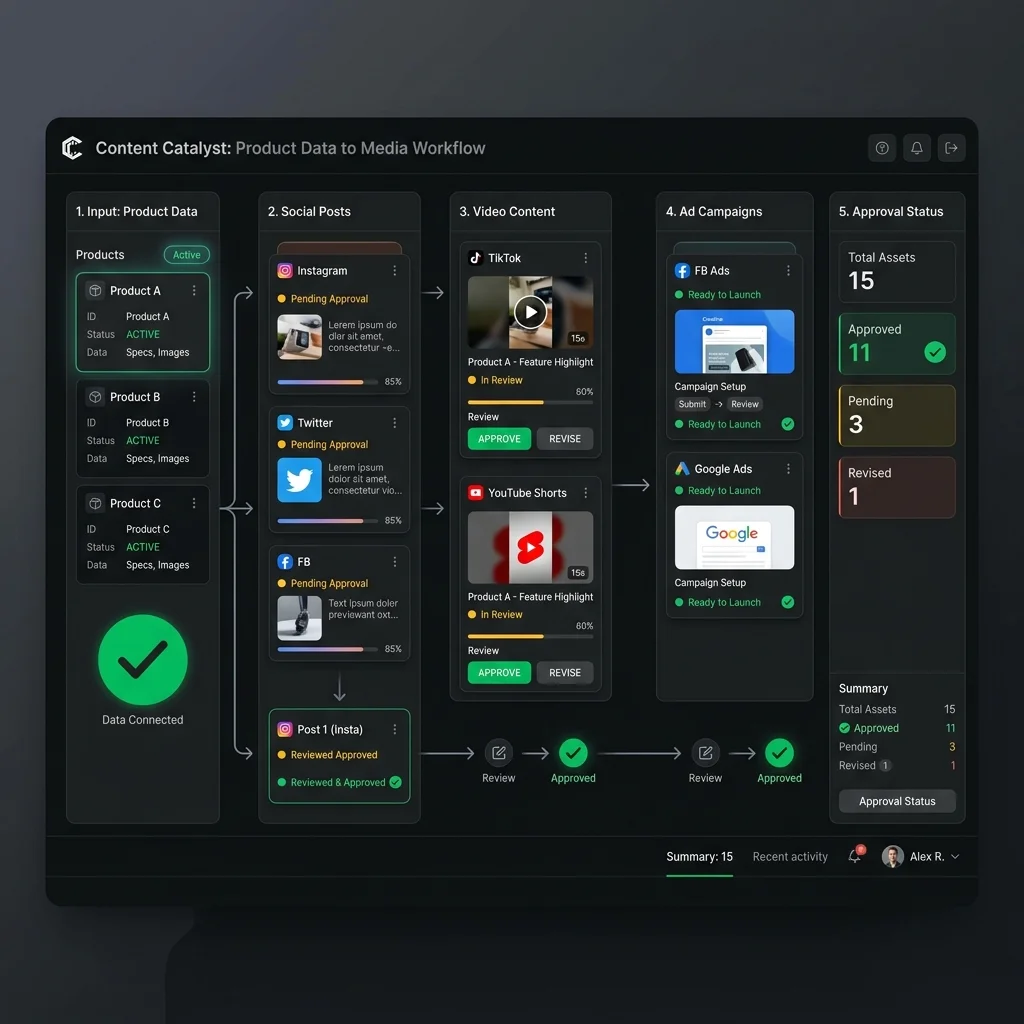
A workspace like AgenixSocial starts from the brand and product. The team can use Brand DNA, Products, Content Studio, Product Shots, AI Creator Videos, Campaigns, Approval Queue, Calendar, and Media Library inside one product-aware workflow.
Human review still matters. But the user is not wiring the whole system from scratch.
That is the difference.
The hidden cost of DIY AI content stacks
The visible cost is subscriptions. The hidden cost is operational drag.
A DIY stack may include:
- Claude subscription or API usage
- Image generation tool
- Video/avatar tool
- Voice generation tool
- Automation platform (n8n or Make)
- Scheduler
- File storage
- Design tool
- Marketplace content tool
- Approval workaround
- Developer or consultant time
Each piece may look reasonable. Together, they create a management layer. As we covered in our detailed breakdown of the hidden costs of DIY AI content automation, the user has to ask:
- Which tool has the latest brand context?
- Which tool has the product data?
- Which image version is approved?
- Which video script was final?
- Which export fits Instagram?
- Which asset fits the marketplace listing?
- Which subscription has credits left?
- Which API key expired?
- Which automation failed?
- Which folder has the final assets?
The joke is that the AI stack starts needing an operations manager. For a large technical team, that may be acceptable. For a founder-led ecommerce team, it is usually too much ceremony.

Decision framework: which path fits your team?
Choose Claude if…
Use Claude when:
- You need strategy, writing, analysis, or brainstorming
- The content task is mostly text
- You can provide good context
- You want reusable Skills or project instructions
- You are comfortable connecting tools when needed
- You do not need native asset generation, review, and scheduling
Claude is excellent for thinking and drafting. It is not the full commerce content workflow unless you build the rest.
Choose n8n if…
Use n8n when:
- You have technical ownership
- You need custom automation
- APIs matter
- The workflow spans many internal systems
- You need conditional logic and control
- Someone can maintain credentials, errors, and workflows
n8n is excellent for workflow automation. It is not a content operating system unless you build one on top.
Choose Make if…
Use Make when:
- You want no-code app-to-app automation
- Your workflows are predictable
- You need visual scenario building
- Your team can handle tool setup
- The content logic is simple enough
- You already use several apps and need handoffs
Make is excellent for connecting apps. It does not remove the need for product-aware content strategy and review.
Choose a commerce content workspace if…
Use a commerce content workspace when:
- The team is non-technical or lean
- Content is product-led
- Brand context should persist
- Product catalog context matters
- Images and videos are part of the workflow
- Marketplace assets are needed
- Campaign planning matters
- Review and approval matter
- Scheduling matters
- Assets need to be reused
- The team wants fewer subscriptions and less tool switching
A commerce content workspace is the right fit when the main job is not building automations. The main job is creating accurate, on-brand, product-aware content repeatedly.
How AgenixSocial fits
AgenixSocial is useful when ecommerce teams want the content workflow itself, not another tool they have to wire into a stack.
It brings together:
- Brand DNA: Reusable brand context and guidelines
- Products: Product source of truth
- Content Studio: Guided content creation
- Product Shots: Product visuals
- AI Creator Videos: Creator-style product videos
- Marketplace Listing Studio: Marketplace image sets
- Amazon A+ Studio: Amazon A+ style modules
- Campaigns: Product and brand campaigns
- Approval Queue: Review before publishing
- Calendar: Scheduling and calendar views
- Media Library: Asset reuse and storage
- Pay-as-you-go credits: Flexible usage model
AgenixSocial is not here to replace human judgment. It is here to reduce repeated setup, context rebuilding, tool switching, and content workflow sprawl.
Teams still review product accuracy, claims, marketplace fit, platform fit, and brand tone before publishing or uploading. That review step is important. No serious ecommerce content workflow should promise perfect output or guaranteed marketplace approval.
The better promise is simpler and more useful: Start with reusable brand and product context. Create content inside guided commerce workflows. Review before publishing. Keep the assets organized.
When a mixed stack makes sense
The answer is not always either/or. Some teams may use both.
For example:
- Use Claude for strategy, research, and high-level campaign ideas.
- Use n8n for backend product-data automation or inventory notifications.
- Use Make for simple app handoffs, like logging published content into an accounting system.
- Use AgenixSocial for product-aware content creation, visuals, videos, campaigns, review, calendar, and media reuse.
That is a healthy split. The danger is using a general automation tool as a substitute for a content workflow, then expecting marketers to maintain the infrastructure.
Use each tool for what it is good at. Do not turn every content task into a systems integration project.
Conclusion
Claude can help you think. n8n can help you automate. Make can help you connect apps.
A commerce content workspace helps ecommerce teams create the actual content they need around real products.
The right choice depends on whether you want to build the system or use the system.
If your team has technical ownership and a highly custom workflow, Claude, n8n, and Make can be excellent.
If your team is trying to create product-aware social content, product images, creator videos, marketplace assets, campaign calendars, and approved reusable media without wiring tools together, a commerce content workspace is the better fit.
For ecommerce teams, the goal is not the most impressive AI stack. The goal is accurate, on-brand, product-aware content that moves from idea to review to calendar to asset library without operational drag.