Shopify AI Content Tools: What They Can Do and What Ecommerce Brands Still Need
Shopify AI tools are useful.
If you run a Shopify store, they can help you write product descriptions, get store guidance, complete admin tasks, and automate parts of your store workflow. That is a good thing.
But there is one mistake many ecommerce brands make: they assume Shopify AI solves all content creation.
It does not.
Shopify can help with store-side content. But ecommerce content does not stop at the product page.
Your brand still needs product posts, product images, creator-style videos, launch campaigns, marketplace assets, ads, approvals, scheduling, downloads, and a place to keep everything organized.
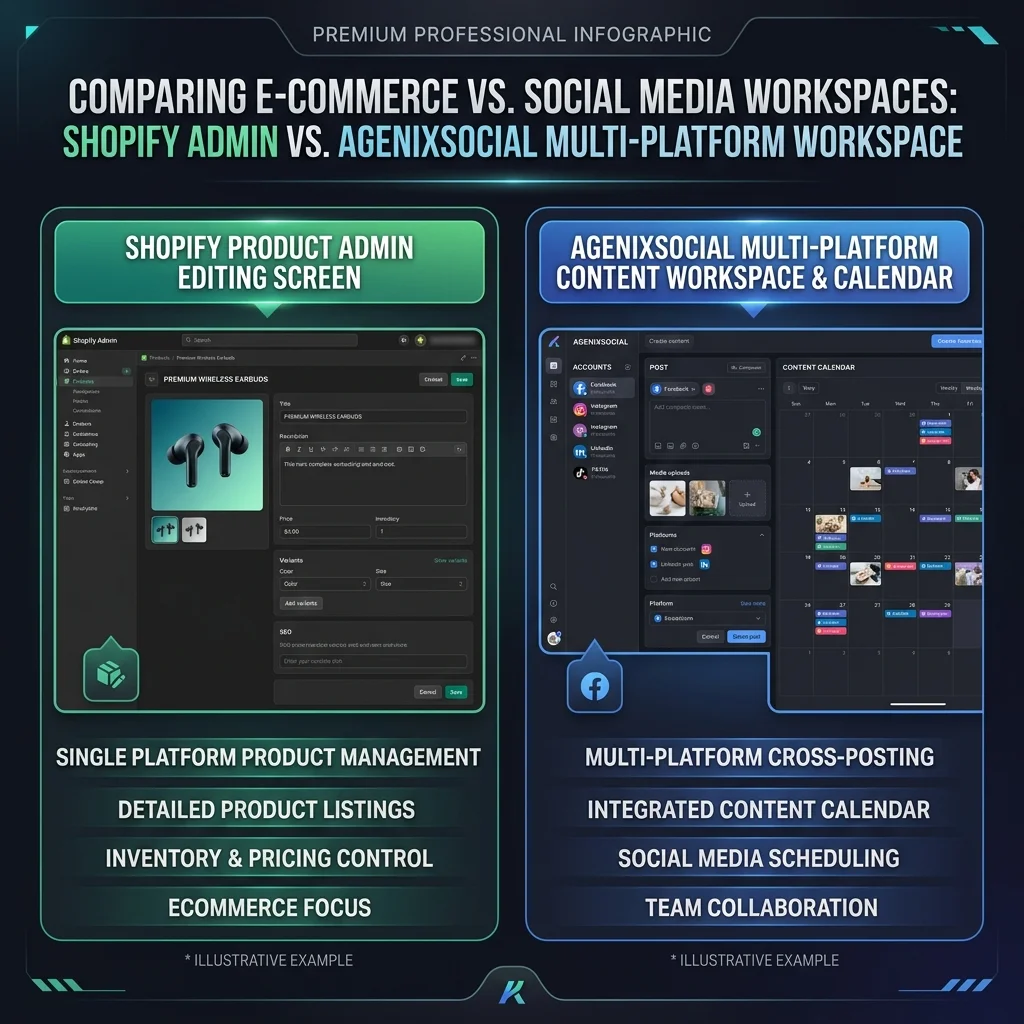
That is where many Shopify brands start feeling the gap. Shopify helps you run your store, but your brand also needs to create content around what you sell.
This guide explains what Shopify AI content tools can do, what they are good for, where they stop, and what ecommerce brands still need when content has to move across social, marketplace, video, campaigns, and review workflows.
Quick answer
Shopify AI tools can help ecommerce brands with store tasks, product descriptions, admin help, and automation inside the Shopify environment. They are useful for improving product page content and store operations. But brands often still need a separate content workflow for social posts, product images, creator videos, marketplace assets, campaigns, approvals, scheduling, and reusable media.
What are Shopify AI content tools?
Shopify AI content tools are AI-powered features inside or around Shopify that help merchants create, edit, understand, or manage store content and business tasks.
The most common examples are:
- Shopify Magic: An AI-powered suite to generate suggestions for text such as product descriptions, email subject lines, and online store headings.
- Sidekick: An AI-enabled commerce assistant in Shopify admin to help merchants get guidance, generate content, and complete tasks using everyday language.
- Shopify Flow: An automation app that helps automate tasks through triggers, conditions, and actions.
- AI apps inside the Shopify ecosystem.
For many Shopify store owners, Shopify AI is a very useful starting point. It can help you move faster inside the store admin.
But it is important to understand what kind of content Shopify AI is mainly built around. Most Shopify AI help starts close to the store: product descriptions, store copy, admin guidance, customer support, and workflow automation. That is valuable.
But ecommerce content teams also create content outside the Shopify product page. That is the part we need to talk about.
What Shopify Magic can help with
Shopify Magic is useful for speeding up writing tasks inside Shopify. For example, it can help write or edit product descriptions based on details you provide, such as product title and keywords.
This is helpful because product descriptions are often one of the first content bottlenecks for ecommerce stores. A founder may have 50 products to upload, a small team may have product details but no polished descriptions, or a marketer may need to rewrite old manufacturer copy.
Shopify Magic can help create a first draft. That draft can then be reviewed, edited, and improved by the team.
Where Shopify Magic is strongest
Shopify Magic is strongest when the work is close to the Shopify store. Good use cases include:
- Drafting product descriptions
- Rewriting product copy
- Generating first-pass store text
- Helping with headings or store section copy
- Speeding up product page setup
- Reducing blank-page writing work
If your main problem is: “I need a description for this product page.” Shopify Magic is a sensible starting point. You are already inside Shopify. The product is already there. You can generate, edit, and review the description in the admin. Simple.
What Sidekick can help with
Sidekick is Shopify’s AI-enabled commerce assistant inside Shopify admin. The idea is simple: instead of clicking through many screens, you can ask for help in everyday language. Sidekick can help merchants understand, manage, and act on store tasks.
For example, a store owner may ask questions about their business, get guidance, generate content, or complete tasks inside Shopify. This can be useful for non-technical users because they do not need to know exactly where every setting lives.
Sidekick is especially helpful when the job is:
- Store operations guidance
- Admin layout help
- Shopify task support
- Understanding store data
- Getting help without leaving the admin
Again, this is valuable. But it is still mostly store-side help. It does not replace the need for a broader brand content workflow.
What Shopify Flow can help with
Shopify Flow helps automate store tasks. It works through a simple idea: when something happens, check the rules, then take an action.
For example:
- When an order is placed, tag the customer.
- When inventory is low, notify the team.
- When a product is added, start a workflow.
- When a customer meets a condition, trigger a follow-up.
- When a risk condition is met, create an internal alert.
Shopify Flow is useful for store operations. It can save time by automating repeatable tasks inside Shopify and across connected apps. But Shopify Flow is not the same thing as a content studio. It can trigger and connect actions, but it does not automatically create product-aware social posts, product shots, creator videos, marketplace image sets, or launch campaigns.
Shopify AI is helpful, but the store is not the whole content workflow
This is the main point: Shopify helps you manage your store, but ecommerce content happens in many places.
Your product may need:
- A product description inside Shopify
- Instagram, Facebook, and TikTok posts
- Product images and lifestyle shots
- Product and brand video ads
- Founder-led posts
- Creator-style videos
- Marketplace image sets
- Amazon A+ style content
- Email teasers
- Multi-platform launch campaigns
- Approval before publishing
- Scheduled social posts
- Reusable media assets
Some of this is inside Shopify. A lot of it is not. That is why Shopify AI can be useful and still not be enough for the full content workflow.

What Shopify AI covers well vs what brands still need
| Content need | Shopify AI can help with | Brands may still need |
|---|---|---|
| Product descriptions | Yes, especially first drafts | Review, brand tone, SEO refinement, reuse in social and marketplace content |
| Store copy | Yes, for Shopify-side content | Campaign copy, social captions, marketplace copy, ad angles |
| Store guidance | Yes, through Sidekick | Broader marketing workflow outside Shopify |
| Store automation | Yes, through Shopify Flow | Content planning, creative production, approval, media reuse |
| Product media on Shopify | Shopify supports hosting images, videos, 3D models | Creating new product visuals, lifestyle images, social visuals, marketplace assets |
| Social posts | Limited or app-dependent | Product-aware posts, carousels, platform-ready captions, scheduled content |
| Product videos | Shopify can host product media | Creating creator-style videos, scripts, language variants, review workflow |
| Marketplace content | Not the main focus | Listing image sets, A+ content, marketplace-specific review |
| Campaign planning | Not the main focus | Product launch calendars, multi-day content plans, approval flow |
| Media library | Shopify stores product media | Cross-channel content library for generated images, videos, posts, downloads |
The gap is not that Shopify is weak. The gap is that Shopify and ecommerce content creation solve different jobs.
The product page is only one part of ecommerce content
A strong product page matters. But customers may discover your product elsewhere first.
They might see:
- Instagram and TikTok posts or Reels
- Facebook and LinkedIn posts
- YouTube Shorts
- Marketplace listings (Amazon, Etsy, eBay)
- Visual ad campaigns
- Founder stories and case studies
- Influencer-style videos
- Google search results and emails
That means the product page is not the only place where content has to work. Your product story needs to travel, and when it travels, it needs to stay accurate and on-brand. That is hard if every channel uses a different tool.
Example: launching a new Shopify product
Imagine you are launching a new travel organizer. Inside Shopify, you may need: product title, product description, price, product images, variants, inventory, SEO title, and meta description. Shopify AI can help with some of that, especially the product description and store-side writing.
But outside Shopify, you may also need:
- Instagram launch post
- Product carousel
- Product-in-use image
- Creator-style video
- Founder post
- Facebook post
- Marketplace image set
- Email teaser
- Campaign calendar
- Approved final assets
- Downloadable content files
Now the workflow becomes bigger. If you only use Shopify AI, you still need other tools for product visuals, product videos, social content, marketplace assets, scheduling, review, and asset organization. That is where many brands start stitching tools together again.
Why Shopify brands still repeat product context everywhere
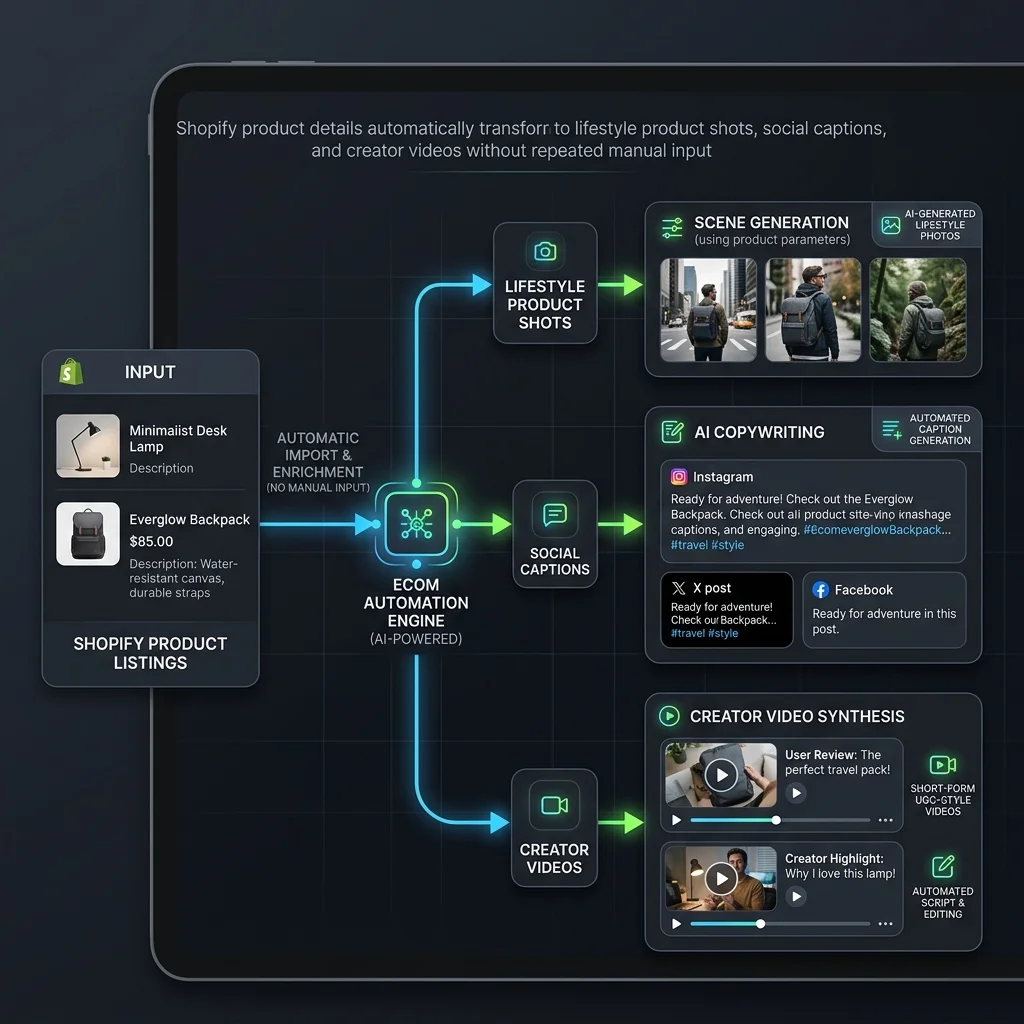
One hidden problem is repeated product context. You may already have product details inside Shopify. But when you create content outside Shopify, you often have to copy those details again.
For example, you might copy and paste the product name, description, benefits, and images into caption tools, video builders, and social schedulers. This is where time disappears.
The product already exists, and the brand already knows what it sells. But the content tools still ask you to explain it again. A better workflow should use product context again and again across content formats.
What Shopify brands still need after product descriptions
Once product descriptions are handled, most brands still need six big things.
1. Product-aware social posts
A generic caption tool can write a caption. But ecommerce social content should know the product. It should understand the product's selling points, target audience, benefits, use cases, and what claims to avoid. Without product context, social posts feel generic.
2. Product images and lifestyle visuals
Shopify can store product images, but brands still need to create better images: studio product shots, lifestyle images, flat lays, detail shots, ad-style visuals, and marketplace images. For many D2C brands, product visuals are one of the biggest bottlenecks. Photoshoots are expensive, freelancers take time, and generic image tools need complex prompts. A product-aware image workflow is much easier.
3. Product videos
Product videos are no longer optional. Brands need short product ads, creator-style videos, founder videos, product explainers, Reels, and TikToks. Shopify can host product media, but creating video content is a separate workflow. You still need script, scene, product context, review, export, and scheduling.
4. Marketplace assets
Many Shopify brands also sell on marketplaces like Amazon. That means they need main images, supporting infographic sets, lifestyle scenes, comparison visuals, product highlights, and Amazon A+ style content. Shopify AI is not mainly built for that.
5. Campaign planning
A product launch is not one post; it is a sequence. A simple launch campaign may include a teaser post, launch announcement, feature explanation, product-in-use image, founder note, social proof, offer reminder, and final call. A good workflow should help plan this before generating assets.
6. Review, calendar, and media library
AI content still needs review. Teams should check product accuracy, claims, pricing, product variant, marketplace fit, platform format, brand tone, and visual accuracy. After review, content needs to be scheduled or downloaded, and assets need to be saved for reuse.
When Shopify AI may be enough vs when brands need more
Shopify AI may be enough when you mainly need product descriptions, store copy help, or simple store task guidance. For early stores, that is fine. Start simple and do not overbuild.
You likely need more when:
- You create social content every week
- You launch products often
- You need product images and videos
- You sell on marketplaces
- You manage multiple products or brands
- You need approvals before publishing
- You want a content calendar and media library
- You keep copying product details into different AI tools
- You want one place that remembers your brand and products
This is when a product-aware content workspace becomes useful.
How AgenixSocial helps Shopify brands
AgenixSocial is useful when Shopify brands need to create content around their products, not only write product descriptions inside Shopify. It starts with Brand DNA and product context, allowing the workflow to remember the brand and work from real products instead of starting from a blank prompt each time.
- Brand DNA: Reusable brand voice and context guidelines.
- Products: Product context acts as the source of truth, avoiding prompt copy-pasting.
- Content Studio: Helps create product-led content easily.
- Product Shots: Creates product and lifestyle visuals connected to your products.
- AI Creator Videos: Supports product-led video workflows with storyboards.
- Campaigns: Helps plan launch and brand campaigns.
- Marketplace Listing Studio: Supports multi-platform marketplace listing image sets.
- Amazon A+ Studio: Supports structured A+ content layouts.
- Approval Queue: Keeps review and approvals in the workflow.
- Calendar: Integrated scheduling and content planning.
- Media Library: Organizing and reusing visual assets.
- Pay-as-you-go credits: Simple, subscription-free creative credits.
AgenixSocial is not here to replace Shopify. Shopify remains the store. AgenixSocial helps with the content workflow around the store.
Use Shopify to manage your products, orders, storefront, checkout, and store operations. Use AgenixSocial when you need to turn those products into social posts, product shots, creator videos, marketplace assets, launch campaigns, review-ready content, scheduled posts, and reusable media.
Shopify plus AgenixSocial: the practical workflow
A simple workflow could look like this:
- Your products exist in Shopify.
- AgenixSocial builds Brand DNA and imports or uses product context.
- Your team selects a product.
- You create social posts, product images, creator videos, marketplace assets, or a campaign.
- Content moves through review.
- Approved content is scheduled, downloaded, or saved to the Media Library.
- Your team reuses the assets across campaigns and channels.
You are not re-explaining the product every time, and you are not jumping between five tools for every launch. The product becomes the starting point for content.
What to review before publishing AI-assisted content
Whether you use Shopify AI, AgenixSocial, or any other AI tool, review still matters. Before publishing, check:
- Is the product name correct?
- Is the product image accurate?
- Are the claims safe?
- Is the price current?
- Are variants represented correctly?
- Does the caption match the brand?
- Does the visual show the product realistically?
- Does the format fit the platform?
- Does marketplace content need extra review?
- Is the final asset saved in the right place?
AI can speed up content creation, but it should not remove brand judgment.
Conclusion
Shopify AI tools are useful. They can help store owners write product descriptions, get guidance, automate store tasks, and move faster inside Shopify.
But ecommerce content does not stop inside the Shopify admin. Your products need to travel into social posts, product images, videos, campaigns, marketplace assets, and review-ready content. That is where many brands still need a broader workflow.
Use Shopify to run your store. Use AgenixSocial when you need to turn those products into content across the channels where customers actually discover, compare, and remember your brand.