How to create Amazon A+ Content with AI
Short answer
To create Amazon A+ Content with AI, start by planning the story before generating images. Define the product, buyer, main benefits, module sequence, brand story, comparison logic, and policy-safe messaging. Then create a storyboard for the A+ modules, review or edit it, and only then generate the final large-format visuals.
Good A+ Content is not a random set of banners.
It is a structured product and brand story.
The job of A+ Content is to help shoppers understand what the product does, why it matters, how it is different, and why they should trust the brand. AI can make this faster, but only if the workflow starts with product context and storyboard planning.
If you start with random image generation, you may get polished visuals that still do not sell.
If you start with a storyboard, every module has a job.
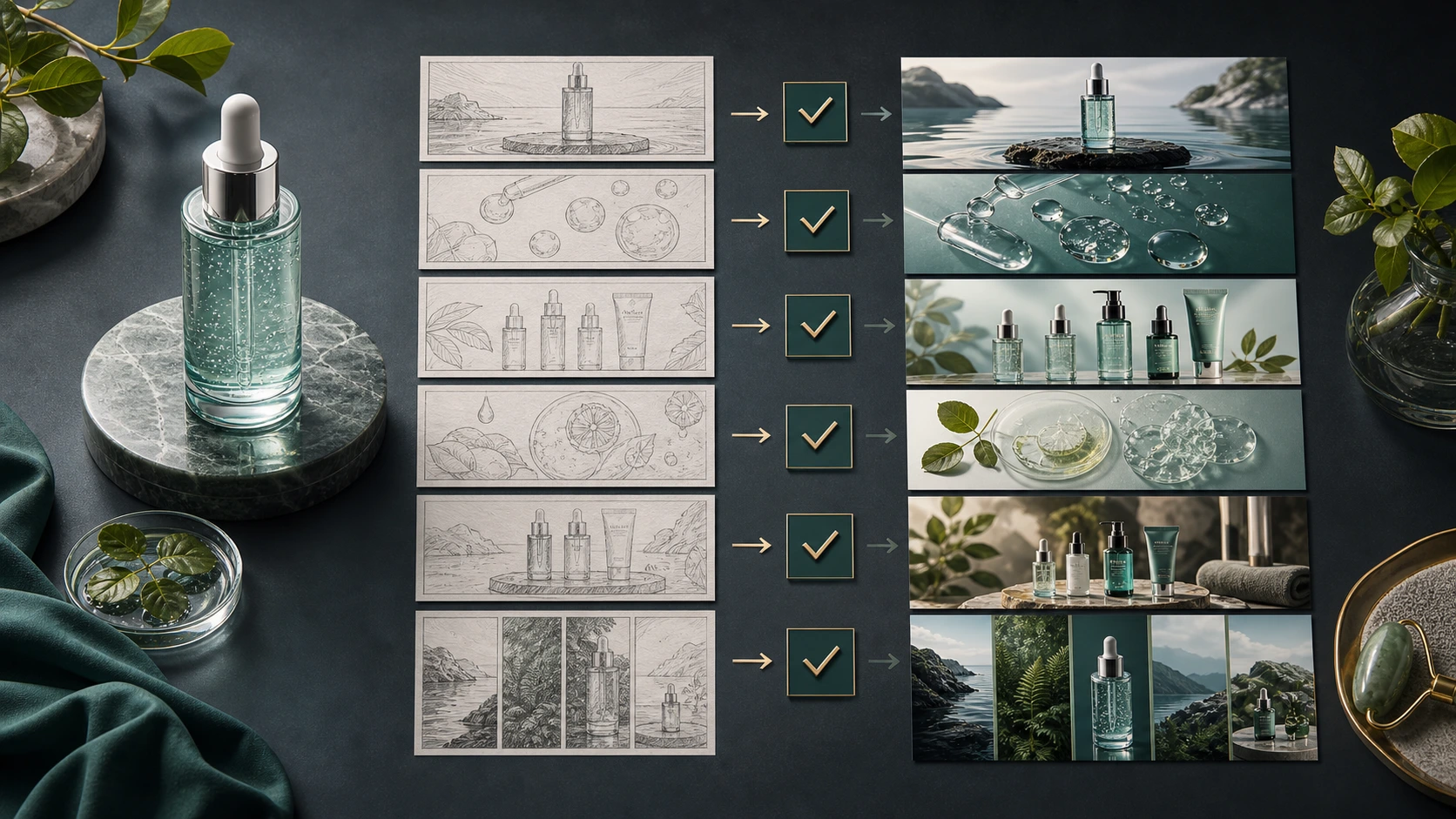
Why Amazon A+ Content matters
Amazon shoppers do not study every line of a listing before forming an opinion.
They scan. They compare. They look for reasons to trust the product quickly.
That is why product images, listing galleries, A+ modules, comparison charts, and brand visuals matter so much. They make the product easier to understand without forcing the shopper to read every bullet point.
Amazon says A+ Content helps brands showcase products and share their story using videos, enhanced images, customized text placements, comparison charts, and more. Sell on Amazon A+ Content
But having access to A+ Content does not automatically make the listing better.
A weak A+ section can look pretty and still fail.
A strong A+ section does three things:
- It explains the product clearly.
- It builds trust in the brand.
- It reduces hesitation before purchase.
That is the real goal.
What is Amazon A+ Content?
Amazon A+ Content is enhanced product detail content that eligible sellers and brands can add to product pages. It helps replace or improve the standard product description area with richer visual and text modules.
A+ Content can include:
- hero brand visuals
- lifestyle images
- product benefit modules
- comparison charts
- technical specifications
- brand story sections
- product education blocks
- videos in supported formats
- richer layouts for product storytelling
Think of it as the deeper storytelling layer below the main listing.
The listing title, bullet points, and product image gallery help shoppers make a quick judgment. A+ Content gives the brand more room to explain, educate, compare, and build confidence.
Amazon’s current help pages also show that eligible sellers can use AI-ready A+ modules, choose specific text and image fields, add a brand-owned ASIN, generate content, and review it before publishing. Amazon Seller Central create A+ content
Amazon A+ Content is not just image creation
This is the most important point.
A+ Content is hard because it is not only about making attractive images.
It requires:
- product positioning
- buyer understanding
- benefit hierarchy
- visual storytelling
- module sequencing
- copy direction
- design logic
- brand consistency
- Amazon-aware content judgment
- review before publishing
A+ Content usually fails when sellers treat it like a set of disconnected banners.
The page may look designed, but it does not guide the shopper.
A better approach is to treat A+ Content like a storyboard. Each module should move the shopper one step forward.
Why Amazon A+ Content is hard to create well
Creating good A+ Content takes more skill than many sellers expect.
The story has to be planned
Before designing anything, the seller needs to answer:
- What is the product’s core promise?
- Who is the buyer?
- What objections does the buyer have?
- What benefits need visual explanation?
- What should the shopper understand after each module?
- Where should the brand story appear?
- What product details need proof?
- What comparison or variant logic is useful?
Without these answers, the design becomes decoration.
The visuals need design logic
A+ modules need to look aesthetic, but aesthetics alone are not enough.
Each module needs visual hierarchy. The shopper should understand the message quickly.
Good A+ design uses:
- clean composition
- readable visual structure
- product-focused scenes
- consistent brand style
- benefit-led framing
- clear module order
- limited but useful copy
- strong image quality
Not every seller has this design judgment in-house.
The brand story needs consistency
A+ Content should not feel like random ad banners from different campaigns.
It should feel like one brand story.
The colors, tone, product presentation, lifestyle setting, and visual language should all feel connected.
This is where Brand DNA matters in an AI workflow. If the AI does not understand the brand, the visuals may look polished but generic.
The content has to support buying decisions
A+ Content should help shoppers decide.
That means the modules should answer real buying questions:
- What does this do?
- Is it right for me?
- What makes it different?
- How do I use it?
- What is inside?
- Why should I trust the brand?
- Which variant should I choose?
A+ Content is not only a branding layer. It is also a decision support layer.
Scaling A+ across products is difficult
Doing A+ Content for one product is manageable.
Doing it for 30 products is a different job.
That means 30 product stories, 30 module plans, 30 benefit hierarchies, 30 visual directions, 30 copy directions, 30 review cycles, and 30 final asset sets.
This is where manual workflows become slow.
It is also where generic AI workflows become messy, because the seller has to keep rebuilding the product and brand context.
The storyboard-first approach to A+ Content
The best way to create Amazon A+ Content is not to start with images.
Start with the storyboard.
A storyboard answers:
- what each module should communicate
- what visual scene each module needs
- what headline or copy direction supports it
- what product benefit comes first
- what feature proof is needed
- what comparison logic belongs in the page
- what brand story should be included
- what content should be avoided
A storyboard protects the seller from creating pretty but disconnected modules.
It also makes review easier. You can fix the flow before spending time generating final images.
This is the core workflow:
- Choose the product.
- Define the buyer and product angle.
- Plan the module sequence.
- Decide the benefit hierarchy.
- Add brand story and trust elements.
- Review the storyboard.
- Generate final A+ visuals.
- Review for product accuracy and policy-safe messaging.
- Save, export, or upload.
This is the workflow A+ Content needs.
A practical Amazon A+ Content structure
A seller-friendly A+ structure can look like this:
- Hero brand or product module
- Product benefit module
- Feature or detail module
- Lifestyle or use-case module
- Comparison or variant module
- Brand story module
- Trust or support module
This is not a rigid rule. Different products need different module flows.
But it gives sellers a strong starting point.
What each A+ module should do
| A+ module | What it should communicate | Why it matters |
|---|---|---|
| Hero brand or product module | The main product promise and brand feel | Helps the shopper understand the product quickly |
| Product benefit module | The top reasons to care | Turns product value into a visual story |
| Feature or detail module | Ingredients, materials, specs, build, or formulation | Gives proof behind the benefit |
| Lifestyle or use-case module | How the product fits into real life | Makes the product easier to imagine |
| Comparison or variant module | Which option is right for the buyer | Helps shoppers choose without confusion |
| Brand story module | Why the brand exists and what it stands for | Builds trust beyond the product |
| Trust or support module | Guarantee, support, care, usage, or quality process | Reduces hesitation before purchase |
A+ Content works when every module has a job.
If a module does not explain, prove, compare, reassure, or build trust, it may not need to exist.
Example: A+ storyboard for a skincare serum
Let’s use a skincare serum as the running example.
Product angle: hydration and glow for daily skincare routines.
Module 1: Hero brand and product module
Purpose: Introduce the serum and create the first impression.
Visual direction: The serum bottle on a premium dark or soft bathroom-inspired setup, with water, glass, or skin-care ritual cues.
Copy direction: Short, benefit-led headline around hydration, glow, or everyday routine.
Module 2: Main benefit module
Purpose: Explain the primary reason the buyer should care.
Visual direction: The serum shown with hydration, texture, or application cues.
Copy direction: Focus on the main benefit, not a long ingredient list.
Module 3: Ingredient or formulation module
Purpose: Explain what supports the benefit.
Visual direction: Ingredient-inspired visuals, formulation texture, dropper detail, or product close-up.
Copy direction: Keep it simple and clear. Do not overload the module.
Module 4: Lifestyle or routine module
Purpose: Show where the product fits in the customer’s day.
Visual direction: Morning or evening skincare routine, shelf setup, clean bathroom counter, or travel routine.
Copy direction: Make the product feel easy to use.
Module 5: Use-case or application module
Purpose: Show how the product is used.
Visual direction: Dropper, application moment, or routine step.
Copy direction: Explain the usage benefit without making unsupported claims.
Module 6: Comparison or variant module
Purpose: Help the shopper choose between variants or understand where this product fits in the lineup.
Visual direction: Product family, compatible routine, or variant comparison.
Copy direction: Compare within your own product range. Do not attack competitor brands.
Module 7: Brand story or trust module
Purpose: Reinforce why the brand is credible.
Visual direction: Brand philosophy, clean formulation story, quality process, or premium product world.
Copy direction: Keep it honest, specific, and brand-led.
This is what a storyboard does. It turns a blank A+ section into a planned selling story.
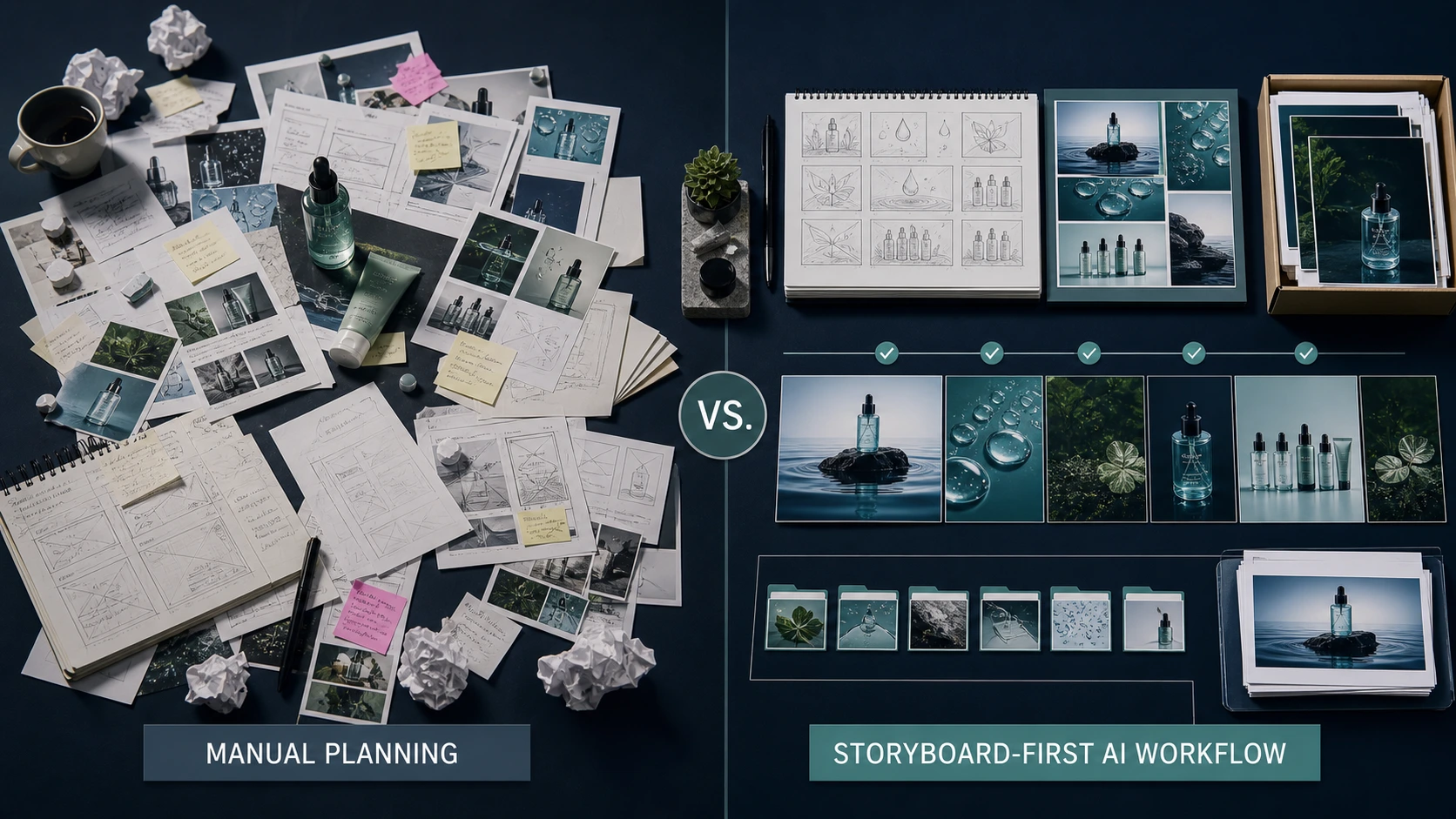
Manual A+ workflow vs AI workflow vs AgenixSocial
| Stage | Manual or agency-led workflow | Generic AI workflow | AgenixSocial A+ Studio workflow |
|---|---|---|---|
| Brand context | Repeated in briefs and revisions | Re-entered manually in prompts | Captured in Brand DNA |
| Product understanding | Shared manually with designer or agency | Added manually for each generation | Uses product catalog context |
| Story planning | Seller, designer, or agency plans manually | Often skipped or improvised | Storyboard is generated first |
| Module flow | Built manually | Created through prompting | Module-by-module storyboard |
| Benefit hierarchy | Manually decided | Prompt-dependent | Included in storyboard |
| Copy direction | Written separately | Generated separately or manually refined | Suggested headline and copy direction included |
| Scene direction | Designer or prompt writer defines manually | Prompted one image at a time | Scene direction included for each module |
| Policy awareness | Checked late in review | Often checked after generation | Policy-mode guidance included in planning |
| Review | Usually after design work starts | After generation | User edits or approves storyboard before generation |
| Final visuals | Designed module by module | Generated one by one | Generated after storyboard approval |
| Export | Manual file handling | Manual downloads | Save to Media Library or download ZIP |
This is the product angle.
AgenixSocial A+ Studio is not just an image generator. It is a storyboard-first Amazon A+ workflow.

How AgenixSocial A+ Studio works
AgenixSocial A+ Studio is built for Amazon A+ content creation.
The workflow starts with product and brand context, not a blank prompt.
The user selects a product and chooses the A+ path:
- Standard A+ for up to 5-module A+ content
- Enhanced A+ for up to 7-module A+ content
- Brand Story for Amazon brand story or page-style content
Then A+ Studio creates a storyboard for that selected product.
The storyboard includes:
- module-by-module visual plan
- suggested headline and copy direction
- image prompt or scene direction for each module
- brand story direction
- benefit hierarchy
- comparison or variant logic
- policy-mode guidance
The user can review, edit, or approve the storyboard.
Only after that does AgenixSocial generate the final large-format A+ visuals.
This matters because the system is not asking the user to guess the module structure from scratch. It gives the seller a planned story before generating final assets.
That is the difference between image generation and content workflow.
Amazon’s own current flow points in the same direction operationally: choose an AI-ready module, add the brand-owned ASIN, generate content, then review before publishing. Amazon Seller Central create A+ content
Why Brand DNA matters for A+ Content
A+ Content needs to feel like the brand.
Without Brand DNA, a seller has to keep re-explaining:
- brand tone
- visual identity
- customer type
- product positioning
- market context
- style preferences
- what the brand should avoid
That creates inconsistent output.
One product may look premium. Another may look generic. Another may look like it belongs to a different category.
AgenixSocial uses Brand DNA so the A+ workflow starts from stored brand context. That means the storyboard and visuals are not created in isolation.
They are connected to the brand’s voice, product context, and marketplace workflow.
Why product context matters
A+ Content should be grounded in what the product actually is.
The system needs to know:
- product name
- product images
- product description
- benefits
- use cases
- ingredients or materials
- variants
- price positioning
- category
- customer expectation
If this context is missing, AI-generated modules can become vague.
A skincare serum might look like any serum. A supplement bottle might look like any supplement. A coffee pouch might look like any coffee pouch.
Product context is what makes the A+ story specific.
This is why product catalog context matters inside AgenixSocial. Shopify products can be imported where supported, and products can also be added manually.
A+ Content and Amazon policy awareness
Amazon A+ Content needs to look good, but it also needs to be marketplace-safe.
That does not mean every sentence needs to sound defensive. It means the seller should be thoughtful.
A+ Studio includes policy-mode guidance so the storyboard and generated modules are planned with Amazon-style content expectations in mind. This helps the seller avoid risky messaging, unsupported claims, competitor references, and module choices that may create review friction.
The seller still reviews and approves the final content before upload.
The right framing is:
AgenixSocial helps create Amazon-compatible A+ assets and a policy-aware storyboard. The seller still owns the final approval before publishing.
What Amazon A+ Content should not do
Good A+ Content should make the product clearer.
It should not create risk or confusion.
Avoid:
- unsupported claims
- misleading comparisons
- competitor brand references
- attacking another brand
- exaggerated outcomes
- unclear technical claims
- inaccurate product visuals
- text that is hard to read
- generic badges without meaning
- visuals that overpromise the product
- category-sensitive wording without review
This is not about making the page boring.
It is about making the content stronger and safer.
Common mistakes sellers make with A+ Content
Mistake 1: Treating A+ like banners
This is the biggest mistake.
A+ Content is not a banner stack. It is a product story.
Mistake 2: Designing without conversion logic
A module can look good and still fail if it does not explain anything useful.
Mistake 3: Overloading the page with text
Copy should support the visual story, not overpower it.
The best A+ copy is short, benefit-led, easy to scan, and tightly matched to the module’s job.
Mistake 4: Skipping the storyboard
If you do not plan the module flow first, the page often feels assembled instead of intentional.
Mistake 5: Using generic images
Generic visuals reduce trust.
A+ visuals should feel connected to the product, buyer, and brand.
Mistake 6: Forgetting mobile behavior
Shoppers may scan quickly. The module story should still make sense at a glance.
Mistake 7: Creating A+ only for one product
If a brand has a catalog, A+ needs to be repeatable. The workflow should scale beyond one hero SKU.
Manual A+ creation for 30 products
Imagine an Amazon seller needs to create or refresh A+ Content for 30 products.
Manual production means:
- 30 product stories
- 30 storyboard decisions
- 30 module plans
- 30 benefit hierarchies
- 30 visual directions
- 30 copy directions
- 30 rounds of review
- 30 final asset sets
This is not just design work.
It is creative operations.
With AgenixSocial A+ Studio, the seller can onboard the brand once, use Brand DNA and product catalog context, generate a storyboard for each selected product, review or edit that storyboard, and then generate the final A+ visuals after approval.
The work still needs review. But the seller is no longer starting from a blank page for every SKU.
How A+ Content connects to listing images
Amazon listing images and A+ Content serve different jobs.
Listing images help shoppers make a fast first judgment.
A+ Content gives the brand more room to educate, compare, explain, and build trust.
A good Amazon content strategy should use both.
For example, if you sell a skincare serum:
- listing images should show the product, use case, key benefit, size, and trust signals
- A+ Content should go deeper into ingredients, routine, formulation, brand philosophy, comparison, and product education
The listing image gallery gets attention.
A+ Content deepens confidence.
That is why Marketplace Listing Studio, Amazon A+ Studio, and your main Amazon listing images should work together.
A practical checklist before publishing A+ Content
Before publishing A+ Content, review:
| Review area | What to check |
|---|---|
| Story flow | Does the module order make sense? |
| Product clarity | Does the shopper understand what the product does? |
| Benefit hierarchy | Are the most important benefits shown first? |
| Brand consistency | Does the page feel like one brand story? |
| Visual quality | Are images sharp, premium, and consistent? |
| Copy clarity | Is the text short, readable, and useful? |
| Policy awareness | Are claims, comparisons, and references safe? |
| Mobile scanability | Can the page be understood quickly? |
| Product truth | Are visuals and claims grounded in the actual product? |
| Next action | Does the page help the shopper feel more confident? |
This checklist helps turn A+ Content from decoration into selling support.
The SELL framework for Amazon A+ Content
Use this simple framework:
S = Show the product clearly
The shopper should understand what the product is without effort.
E = Explain the benefit
Do not only list features. Explain why the product matters.
L = Lead with story
Connect the product to the customer’s life and the brand’s reason to exist.
L = Lower hesitation
Use modules to answer objections, clarify details, compare variants, and build trust.
This framework is simple, but it works.
If your A+ Content does not show, explain, lead, or lower hesitation, it probably needs a stronger storyboard.
When AI is especially useful for Amazon A+ Content
AI is especially useful when:
- you have many SKUs
- you need A+ visuals faster
- you want to reduce designer dependency
- you need consistent brand storytelling
- you want to test module ideas
- you want product-specific A+ storyboards
- you need large-format visual assets
- you want to reduce repetitive creative planning
The biggest advantage is not only speed.
The biggest advantage is that the system can reuse brand and product context.
That makes the workflow more repeatable.
When you may still need a designer or specialist
AI can help a lot, but some situations still benefit from a designer, agency, or Amazon specialist.
You may want specialist help when:
- the product is highly regulated
- the design system is very premium
- the A+ module needs complex custom illustration
- claims require legal review
- the category has strict content sensitivity
- the brand is doing a flagship launch
- the product story is unusually technical
- the team wants a bespoke visual identity
AI does not remove judgment.
It reduces the repetitive production burden.
Final takeaway
Amazon A+ Content is not about filling space below the listing.
It is about helping the shopper understand, trust, and choose the product.
That requires more than good-looking images.
It requires a story.
The best workflow is storyboard-first: plan the product story, module sequence, benefit hierarchy, visual direction, copy direction, and policy-safe messaging before final images are generated.
That is where AI becomes useful.
And that is where AgenixSocial A+ Studio fits.
It uses Brand DNA and product context, creates a complete storyboard for the selected product, lets the user review or edit it, and then generates the final A+ visual modules after approval.
Create storyboard-first Amazon A+ Content with Amazon A+ Studio. It fits naturally with Product Shots, Marketplace Listing Studio, marketplace sellers, Amazon sellers, teams evaluating pay-as-you-go pricing, and sellers who want the right supporting answers in the main FAQ.
FAQ
What is Amazon A+ Content?
Amazon A+ Content is enhanced product detail content that lets eligible sellers and brands add richer visual and text modules to product pages. It helps explain the product, showcase benefits, compare variants, and tell the brand story.
How do you create Amazon A+ Content with AI?
Start with product context, brand context, and the buyer’s main questions. Then create a storyboard for the A+ modules, review the flow, generate the visuals, check the content, and publish through Amazon’s A+ Content Manager.
What should Amazon A+ Content include?
A strong A+ section can include a hero product module, benefit module, feature or detail module, lifestyle module, comparison or variant module, brand story module, and trust or support module.
Why should A+ Content be storyboard-first?
A storyboard helps define what each module should say before images are generated. It prevents disconnected banners and makes the final A+ Content feel more intentional.
Can AI create Amazon A+ Content?
Yes. AI can help create A+ visuals, copy direction, and module plans. The best results come when AI works from accurate product context, brand context, and a planned storyboard.
How does AgenixSocial A+ Studio work?
AgenixSocial A+ Studio creates a storyboard for the selected product before generating final images. The storyboard includes module planning, headline and copy direction, scene direction, brand story, benefit hierarchy, comparison logic, and policy-mode guidance. The user can review, edit, or approve the storyboard before final visual generation.
What is the difference between Amazon listing images and A+ Content?
Listing images help shoppers make a fast first decision. A+ Content gives the brand more room to educate, explain, compare, and build trust lower on the product detail page.
Does Amazon A+ Content need compliance review?
Yes. AI can help create Amazon-compatible formats and policy-aware storyboards, but sellers should still review final content for claims, competitor references, category rules, and product accuracy before uploading.